Scheduler
Some work has to happen on its own, without anyone opening the admin panel: refreshing shipment statuses, sending abandoned-cart reminders, processing the fiscal receipt queue, optimizing uploaded images. In older systems that meant asking the hosting provider to add cron lines. ECMS9 does it itself — Settings → Scheduler.
How it works
The site starts its own tasks while it is being used. Every visit — to the storefront or to the admin panel — nudges the scheduler, which starts the work in a separate process, at most once a minute. Nobody waits for it: the visitor's page is served as usual while the task runs alongside.
That means a site with normal traffic needs no setup at all.
Tasks run while the site lives. If a shop gets no visits at night, the tasks scheduled for that time run at the next visit. When exact timing matters (nightly reports, for example), add one cron line — the page shows the ready command.
The task list
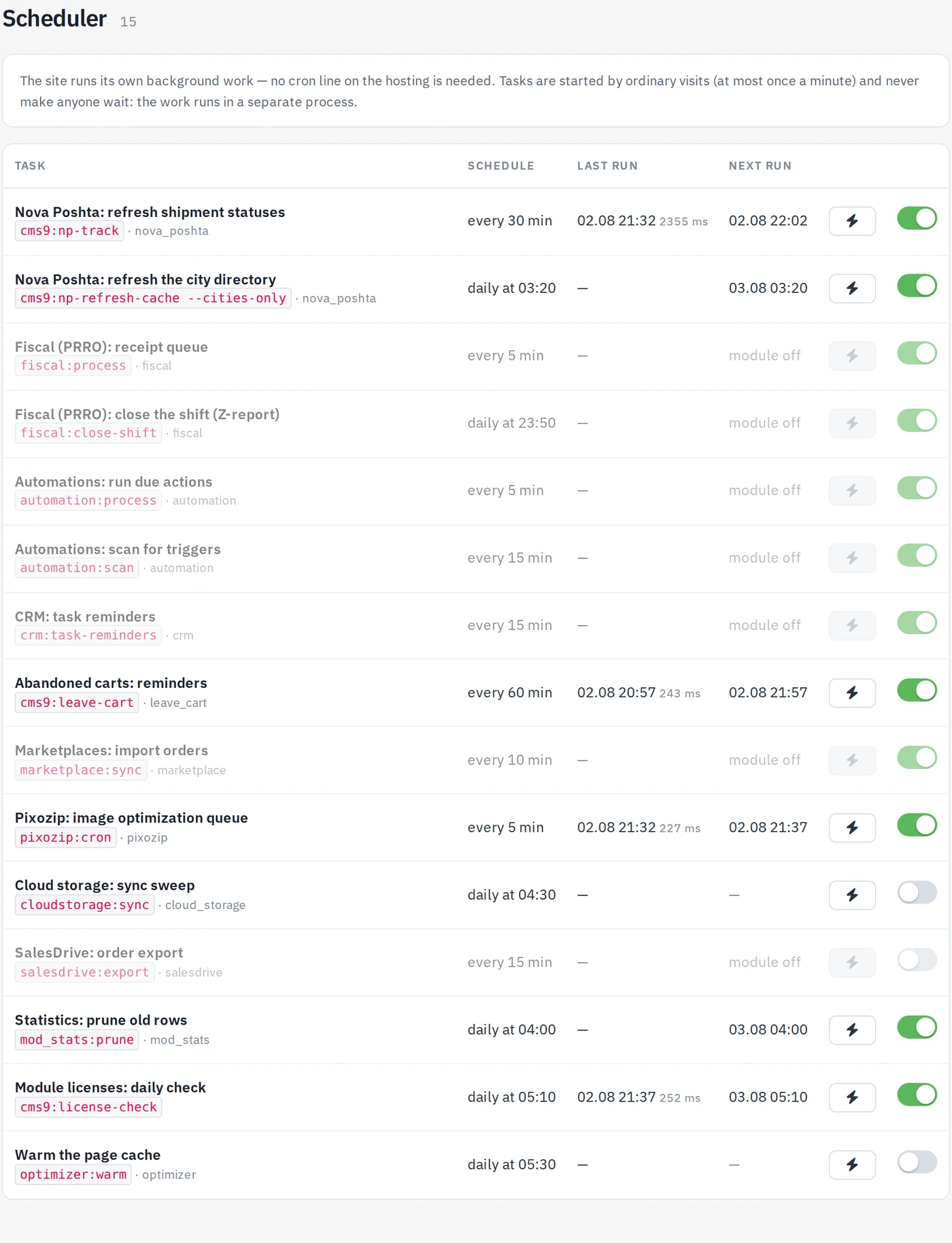
Each row shows the schedule, when the task last ran (and how long it took) and when it is due next:
- switch on the right — turn the task off, or back on;
- ⚡ button — run it now, without waiting for the schedule. The task's output appears right under the row, which is the quickest way to see whether a module is configured correctly;
- a task whose module is switched off (or not installed) is greyed out and never runs.
Tasks that failed on their last run are marked in red with the error text.

What is in the schedule
The list depends on the modules you have installed:
| Task | Default schedule |
|---|---|
| Nova Poshta: refresh shipment statuses | every 30 minutes |
| Nova Poshta: refresh the city directory | daily, 03:20 |
| Nova Poshta: refresh the branch cache (in batches) | every 15 minutes |
| Nova Poshta: local street directory (in batches) | every 15 minutes |
| Fiscal (PRRO): receipt queue | every 5 minutes |
| Fiscal (PRRO): close the shift (Z-report) | daily, 23:50 |
| Automations: run due actions | every 5 minutes |
| Automations: scan for triggers | every 15 minutes |
| CRM: task reminders | every 15 minutes |
| Abandoned carts: reminders | hourly |
| Savings bonuses: write off expired | daily, 03:40 |
| Savings bonuses: expiry notifications | daily, 09:10 |
| Marketplaces: import orders | every 10 minutes |
| Pixozip: image optimization queue | every 5 minutes |
| Cloud storage: sync new files | every 2 minutes |
| Headless API: prune tokens and carts | daily, 04:10 |
| Statistics: prune old rows | daily, 04:00 |
| Module licenses: daily check | daily, 05:10 |
Some tasks are off until you enable them — page-cache warming (daily, 05:30), the cloud-storage sync sweep (daily, 04:30) and the SalesDrive order export (every 15 minutes). Turn them on when you need them.
A task only runs when its module is installed AND enabled AND the task's own switch is on. Disabling a module in the module list silently stops all of its scheduled work.