Stock control by order status
ECMS9 keeps stock in sync with orders automatically: order statuses decide when goods are written off, reserved or returned.
Status actions
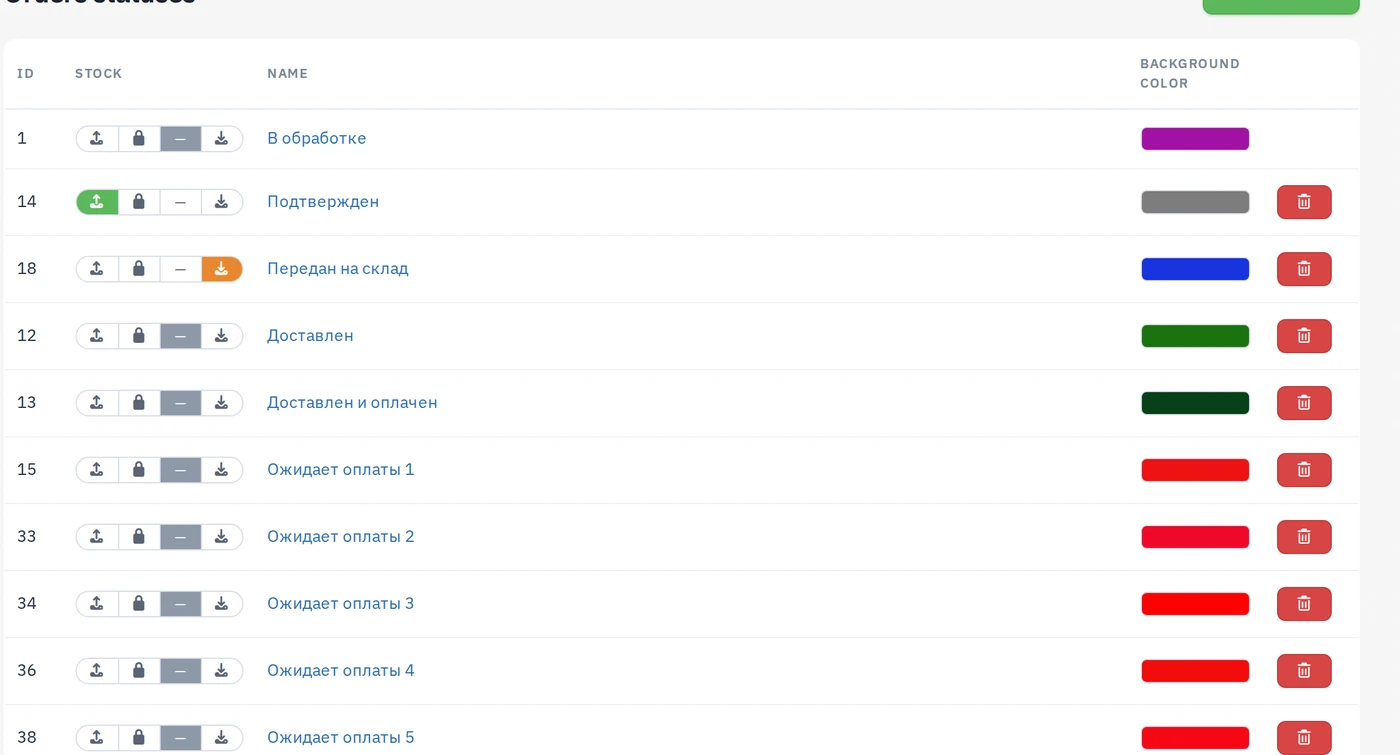
Each order status (Orders → Order statuses) has a three-position stock switch:
- Write off — moving an order into this status deducts its products from stock (e.g. "Shipped");
- — (neutral) — the status does not touch stock;
- Return — the products go back to stock (e.g. "Cancelled", "Returned").
There is also a reserve action: the products are held for the order without leaving the sellable pool permanently — useful for "Confirmed, not yet shipped". The shop settings let you reserve right when an order is created.
Editing order lines in an already written-off order adjusts stock by the difference automatically.
Warehouses
Without the Warehouses module everything works against one default warehouse created automatically. With the module installed the ledger integrates with it: each variant's per-warehouse quantities stay the source of truth, and a Movements page shows the journal of every stock change with its reason (order, manual correction, import).
Availability check at checkout
When enabled in the shop settings, the checkout verifies stock server-side: if someone bought the last piece a second earlier, the customer sees an honest "not enough stock" message instead of a phantom order.
Weight-based (packaging) products
Products sold "in packaging" share one stock pool in base units: each variant is a prepackage (0.5 kg, 1 kg…), and a sale deducts prepackage × quantity from the pool for all variants at once.
The toggle sits next to the Active switch on the product form; hovering it shows a short reminder of this model. Enable it only when the variants are different amounts of the same thing — not for colors or sizes.