UkrSklad exchange
UkrSklad (ukrsklad.com) is a desktop stock-and-sales program. Its built-in "synchronisation with an online shop" connects to the site itself over HTTP and exchanges ZIP archives with CSV files. The ECMS9 module speaks that protocol on the site side — the program is configured exactly as it would be for an OpenCart shop, with the URL and credentials the module shows you.
The settings page is UkrSklad exchange in the modules list (it opens
/admin/ukrsklad). The exchange is active only when both the login and the
password are filled in; with empty credentials the endpoint answers 403 and
the program cannot connect.
What is exchanged
From UkrSklad to the site ("Надіслати дані на сайт" in the program):
- product groups → shop categories (created or updated by name);
- products → product variants: one UkrSklad position is one variant. Price (a promo price becomes the current price with the old price kept), stock, code → SKU, barcode → article, name, description, brand and category. A product that already has several variants only gets price / stock / codes updated — its name, description and category stay as they are;
- photos (the site asks for up to 20 per exchange, so they arrive over a few runs);
- the UKTZED code of each position, written into the product custom field.
From the site to UkrSklad ("Прийняти дані в УкрСклад"):
- categories, products with prices and stock, photo metadata;
- customers — registered and guest;
- orders with their items, changed after the date the program keeps ("Дата і час останніх отриманих даних з сайту"), filtered as described below.
Large catalogs are transferred in chunks automatically. Weight and dimensions are not part of the exchange.
Settings
Access for the program card:
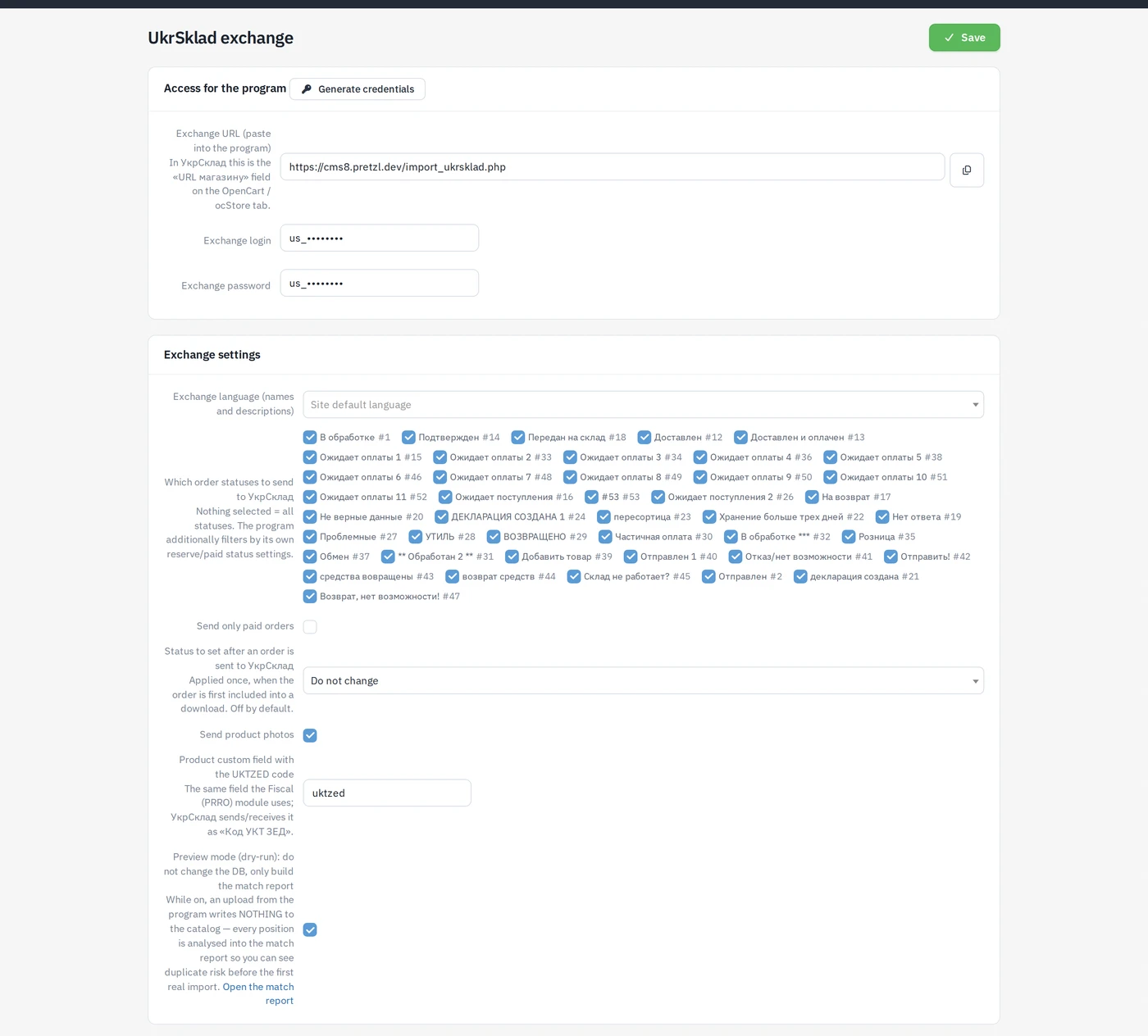
| Field | Meaning |
|---|---|
| Exchange URL (paste into the program) | https://your-site/import_ukrsklad.php — read-only, with a copy button. In UkrSklad this is «URL магазину» on the OpenCart / ocStore tab. |
| Exchange login / Exchange password | Basic-auth credentials the program sends. Generate credentials fills in strong random ones. |
Exchange settings card:
| Field | Default | Meaning |
|---|---|---|
| Exchange language (names and descriptions) | site default | Which language of names and descriptions is read and written. |
| Which order statuses to send to УкрСклад | all | Nothing selected = all statuses. The program additionally filters by its own reserve/paid status settings. |
| Send only paid orders | off | Export only orders with the paid flag. |
| Status to set after an order is sent to УкрСклад | Do not change | Applied once, when the order is first included into a download. |
| Send product photos | on | Turn off to keep the export to data only. |
| Product custom field with the UKTZED code | uktzed | See below. |
| Preview mode (dry-run) | off | See below. |
Preview mode for the first import
The first upload from the program into an existing catalog is the risky
moment: every position the module cannot match to an existing variant is
created anew, i.e. a duplicate. Preview mode (dry-run): do not change the DB,
only build the match report removes that risk: while it is on, an upload
from the program writes nothing to the catalog — every position is only
analysed and recorded into the match report (/admin/ukrsklad/dryrun,
link Open the match report).
Matching happens in three tiers, the same in preview and in a real import:
- the site variant id the program remembered from a previous exchange;
- the module's own map (UkrSklad number → variant);
- a search inside the target category by name, by code or by name + code — whichever the program's own "find product by" setting says.
The report summarises the positions as Matched (would update), Norm-name only (rescuable) (no strict match, but a variant with the same normalised name exists somewhere on the site — a hint to align names or codes before the real run), No match (would insert = duplicate risk) and Group not on site (category skip), and lists every position with its match tier and the matched product. Fix the names/codes, run the upload again, and switch preview mode off once the "would insert" column holds only genuinely new products.
While it is on, every upload from the program is a dry run — the catalog does not change. Turn it off when you are done, otherwise the real import never happens.
The UKTZED field shared with fiscalization
UKTZED is one attribute of a product, used by two modules: the
Fiscal (PRRO) module sends it in receipts, UkrSklad
sends and receives it as «Код УКТ ЗЕД». To keep both on the same field, when
the Fiscal module is present and has its own field name configured, that
name wins and the UkrSklad setting is ignored; only without the Fiscal
module does the setting here (then the uktzed default) apply.
Order status flow
A typical flow: invoice → awaiting payment → paid and confirmed (warehouse packs) → handed to the warehouse → shipped. Orders are usually transferred to UkrSklad when the warehouse should see them, so:
- pick the statuses to export in Which order statuses to send to УкрСклад and, if you want, tick Send only paid orders;
- optionally set Status to set after an order is sent to УкрСклад — the order moves there once, the first time it is included into a download; later exchanges do not touch its status again. Each order also carries its paid flag and site status, which the program maps onto its own "reserved" / "paid" statuses.
Configuring the UkrSklad program
The steps repeat the guide shown on the settings page:
- Fill in the login/password and save.
- In UkrSklad open «Синхронізація з Інтернет-магазином» → Параметри, tab «OpenCart / ocStore».
- Tick «Синхронізація включена», paste the exchange URL into «URL магазину» and the credentials into «Логін до скрипту» / «Пароль до скрипту».
- Press «Тест з'єднання» — the site answers «Тест ОК».
- Press «Інформація про сайт» — the program loads the site languages and order statuses; then pick the statuses for «Резервування товару» and «Товар оплачений».
- Set «Дата і час останніх отриманих даних з сайту» — orders changed after this date are fetched on the next exchange.
- First run: «Надіслати дані на сайт» pushes the UkrSklad catalog to the site (with preview mode on first, see above); «Прийняти дані в УкрСклад» pulls orders and customers.
Journal
The Exchange journal (last 20) card logs every request from the program:
time, action (test, upload, download, …), number of rows, result and a
detail message — the first place to look when the program reports an error.
Clear journal empties it.