Fiscalization (PRRO)
The Fiscal module turns paid orders into fiscal receipts through the Ukrainian PRRO service Vchasno.Kasa (kasa.vchasno.ua). Nothing is sent synchronously: a paid order lands in a receipt queue, the queue is processed in the background, and the customer gets a letter with a link to the receipt. The module is built into ECMS9 and is "on" exactly when a cash register token is saved — with an empty token it makes no requests at all.
The settings page is Fiscalization (PRRO) in the modules list (it opens
/admin/fiscal).
What it does
- Sale receipts — registered when an order becomes paid.
- Refund receipts — queued when the paid flag is removed from an already fiscalized order (optional switch), or by hand for a specific order.
- Shift handling — before the first receipt of the day the shift is opened automatically; the nightly task closes it (Z-report). A PRRO shift must not stay open longer than 24 hours.
- UKTZED codes for excise goods (alcohol, tobacco, fuel) are taken from a product custom field and sent in the receipt line.
- Receipt PDF / print — on the order edit page the "Fiscal receipt (PRRO)" card shows each receipt with Open receipt (the public Vchasno viewer) and Print receipt (the ready PDF — print it from the viewer).
- E-mail to the customer — after a sale receipt, the buyer receives the
fiscal_receiptletter with the receipt link and the PDF attached (when the order has a valid e-mail and the e-mail module is present).
When a receipt is queued
A sale receipt is queued the moment an order becomes paid, whichever way that happens:
- a payment gateway callback confirms the payment (LiqPay, Mono, WayForPay and the other online methods);
- a manager switches the order to "paid" in the order form or in the list;
- a manager moves the order to the status that means "paid" (status #2 by the shop rule) — the module checks the resulting paid flag.
Several events for the same order are harmless: the queue deduplicates on order + receipt type. A refund receipt is queued only on the explicit "paid → not paid" change and only if the corresponding switch is on — ordinary status moves never create refunds.
Cash on delivery with a carrier (Nova Poshta and the like) is fiscalized by the carrier. Map such methods to Do not fiscalize — the order is then marked "Skipped" in the queue and no receipt is sent.
Settings
Connection card:
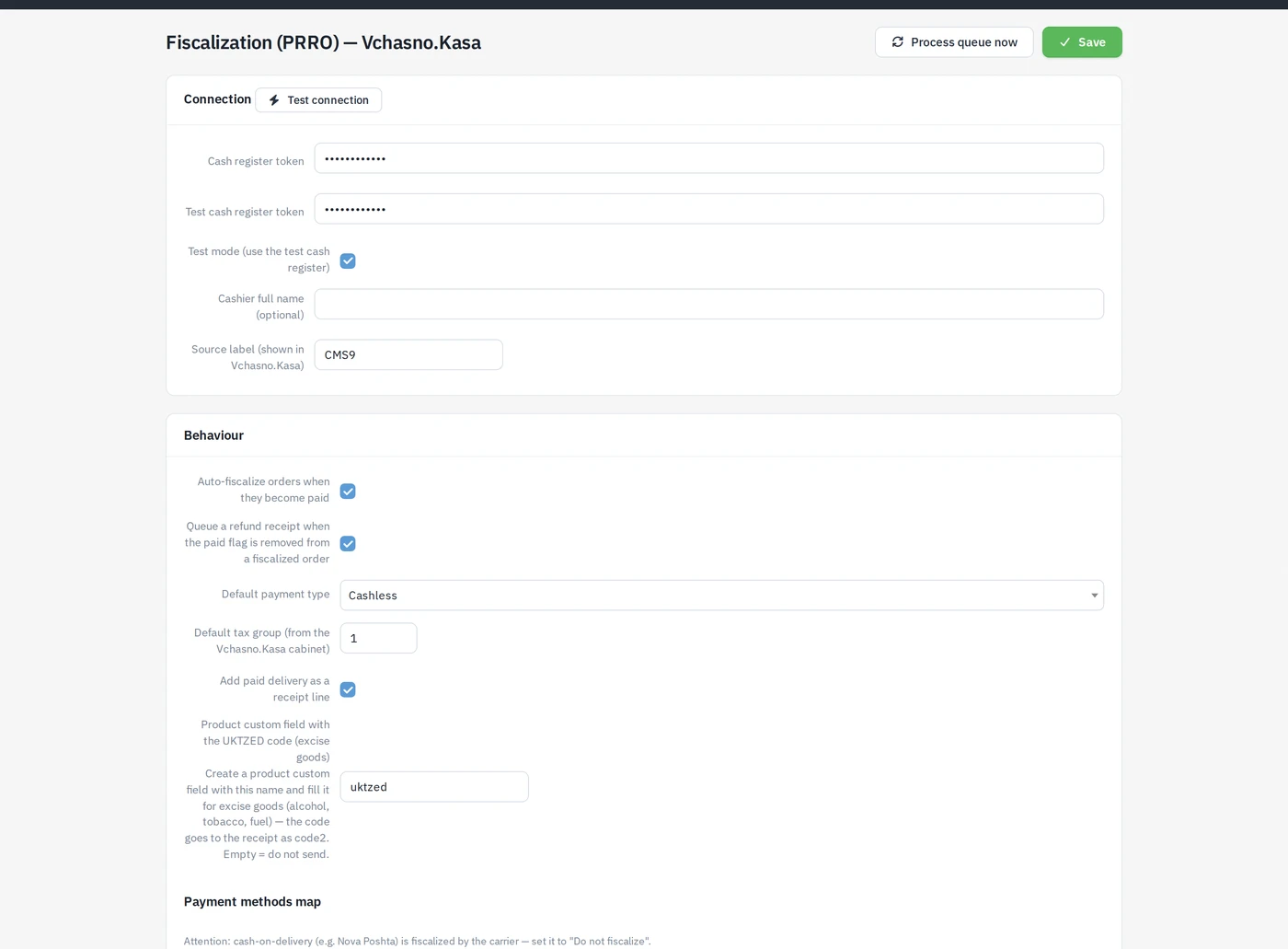
| Field | Meaning |
|---|---|
| Cash register token | Token of the live cash register from the Vchasno.Kasa cabinet (Trade points and cash registers → gear → Token). |
| Test cash register token | Token of the test register you get on registration. |
| Test mode (use the test cash register) | Sends everything to the test register — for a dry run. |
| Cashier full name (optional) | Printed on the receipt. |
| Source label (shown in Vchasno.Kasa) | How the site is labelled in the cabinet; default CMS9. |
Test connection checks the token and reports the shift status (open / closed).
Behaviour card:
| Field | Default | Meaning |
|---|---|---|
| Auto-fiscalize orders when they become paid | on | The master switch for automatic sale receipts. |
| Queue a refund receipt when the paid flag is removed from a fiscalized order | off | Refund receipt on "paid → not paid". |
| Default payment type | Cashless | Cashless / Card / Cash — used for payment methods without their own mapping. |
| Default tax group (from the Vchasno.Kasa cabinet) | 1 | The tax group number configured in the cabinet. |
| Add paid delivery as a receipt line | on | Delivery cost becomes a separate line of the receipt. |
| Product custom field with the UKTZED code (excise goods) | uktzed | Name of the product custom field; empty = never send the code. |
| Payment methods map | — | For every shop payment method: Default / Cashless / Card / Cash / Do not fiscalize. |
Card and online payments → Cashless, cash on pickup → Cash, carrier cash on delivery → Do not fiscalize. Everything else falls back to the default payment type.
Background tasks
The queue is processed by two tasks that are visible in Settings → Scheduler:
- PRRO: receipt queue (
fiscal:process) — every 5 minutes; registers the due receipts, opens the shift if needed. A failed receipt is retried with a growing delay (5 minutes × number of attempts), up to 5 attempts, then it is marked "Failed". - PRRO: shift close (Z-report) (
fiscal:close-shift) — daily at 23:50; an already closed shift counts as success.
The setup guide on the settings page also shows the equivalent cron lines for a server where you prefer a real cron. Process queue now on the settings page runs the queue immediately without waiting.
Queue state and errors
The Receipt queue (last 20) card on the settings page lists every task: order, type (Sale receipt / Refund receipt), status (Pending, Processing, Done, Failed, Skipped), number of attempts, the Open receipt link and the last error text. Failed and skipped tasks have a Retry button that puts them back into the queue. The same information for one order is shown in the "Fiscal receipt (PRRO)" card on its edit page.
Run a few test orders with Test mode on and the test token filled in, check that the receipts open in the viewer and that the letter arrives, then switch test mode off. The live token is used only when test mode is off.