Cloud Storage
The Cloud Storage module keeps the files from /uploads — product images,
gallery pictures, editor uploads, generated thumbnails — in external storage:
Cloudflare R2, any S3-compatible bucket (AWS S3, MinIO, Hetzner and
the like) or a plain FTP server. It frees disk space on the hosting, lets
pictures be served from a CDN domain, and works as a file bus between servers
when a shop runs on more than one.
The settings page is Modules → Cloud Storage (/admin/cloudstorage). The
module's tables are created by php spark cloudstorage:install (run once after
installing it from the store; a self-update runs it for you).
How it works
The module does not intercept uploads. Files land in /uploads exactly as
before, and the module syncs them afterwards:
- Right after an admin upload — when an admin request carried files, a bounded batch (up to 30 fresh files) is pushed to storage immediately.
- Every 2 minutes — the Scheduler task Cloud storage: sync new files picks up everything the first hook cannot see: thumbnails generated on the storefront, CLI imports, files written on the other server of a two-server setup (up to 300 files per pass).
- Sync now on the settings page runs a larger pass by hand (up to 200 files); the result line tells you how many were sent.
Each synced file is recorded in an index (path, size, modification time). A file that changes locally is re-uploaded; if the Cloudflare module is connected its cached URL is purged so the new version shows up at once.
Serving
Two delivery modes, chosen by the URL rewrite on pages switch:
- Off — addresses stay native (
/uploads/...). A file that still exists locally is served by the web server as usual; a file that has no local copy is fetched from storage by the module's built-in proxy under the same address, with 30-day public cache headers (LiteSpeed caches it too). No extra domain is needed. - On — page HTML is rewritten so
/uploads/...links point to the Public base URL (your CDN domain) and the browser goes to storage directly. A link is rewritten only when the local copy is gone and the file is in the index — a local file always wins, so a half-migrated shop renders correctly, and a disabled module simply means everything is local.
Freeing disk space
By default local copies are kept. Tick Delete local copies and, after a
file's presence in storage is verified, the local copy is removed — the 2-minute
task then gradually offloads the whole /uploads on its own. Turned off again,
the proxy restores a local copy the first time a file is requested.
Regenerating product thumbnails reads the originals from disk. Before doing it
on an offloaded shop, bring them back:
php spark cloudstorage:restore --prefix shop/products/origin.
Settings
Backend card:
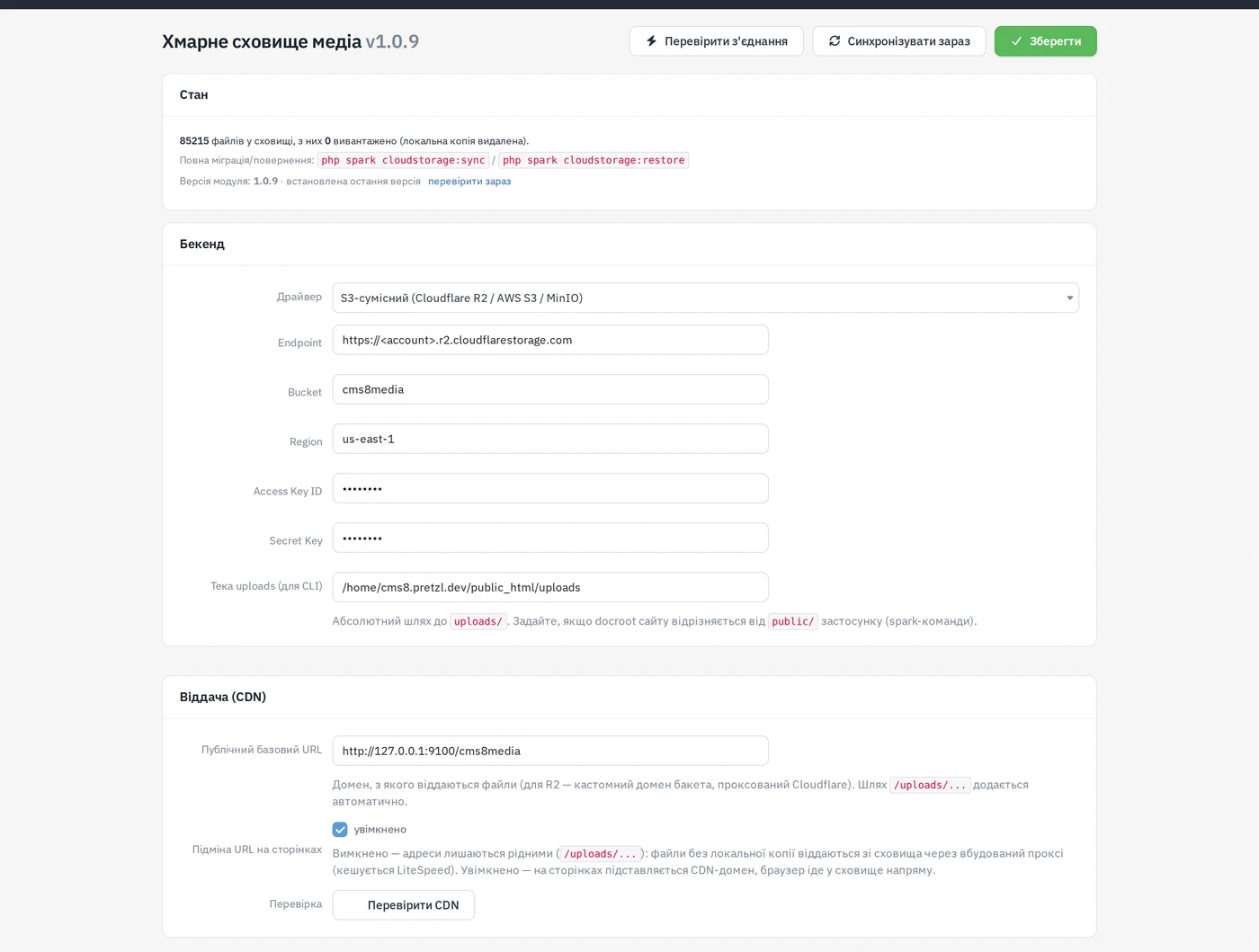
| Field | Meaning |
|---|---|
| Driver | S3-compatible (Cloudflare R2 / AWS S3 / MinIO) or FTP server. |
| Endpoint, Bucket, Region, Access Key ID, Secret Key | S3 credentials. Region auto for R2. Leave the secret empty to keep the stored one. |
| FTP host / port, User, Password, Root folder | FTP credentials and the directory files go under. |
| Uploads folder (for CLI) | Absolute path to uploads/; set it when the site's document root differs from the application's public/ — the spark commands need it. |
Delivery (CDN) card:
| Field | Meaning |
|---|---|
| Public base URL | Domain files are served from (for R2 — the bucket's custom domain behind Cloudflare). /uploads/... is appended automatically. |
| URL rewrite on pages | The two delivery modes above. |
| Check CDN | Runs the whole chain — test upload, anonymous read from storage, base URL, DNS, end-to-end fetch — and offers fixes: Use the direct storage address, Open public read (uploads/*) for the bucket, Connect the domain through Cloudflare for R2. |
Sync card:
| Field | Meaning |
|---|---|
| Delete local copies | Offload mode, see above. |
| Exclusions (prefixes) | Paths relative to uploads/, one per line (e.g. shop/products/origin, cmlTemp) that are never synced or offloaded. |
The toolbar has Test connection (checks that the credentials, bucket and endpoint line up), Sync now, Save, and an Update module button that appears when the store has a newer version. The Status card counts files in storage and how many are offloaded.
Migration and rollback (command line)
| Command | What it does |
|---|---|
php spark cloudstorage:sync | Full migration of /uploads to storage. Options: --prefix, --limit, --offload / --keep-local (override the setting for this run), --dry-run. |
php spark cloudstorage:restore | Downloads offloaded files back to /uploads (--prefix, --limit). Files come back byte-identical. |
php spark cloudstorage:quick | The bounded pass the scheduler runs (--limit, default 300). |
Create the bucket, fill in the S3 fields with region auto, save, press
Test connection, then Check CDN — it tells you whether the bucket is
readable and whether the public domain resolves, and offers the fix. Keep
Delete local copies off until the first full cloudstorage:sync has
finished and the pages look right.