AI chat on the storefront
The AI chat module puts a consultant widget on every page of the shop. It answers shoppers from the shop's own data — catalogue, stock, delivery and payment terms, site pages, order status — and hands the conversation over to a manager the moment a human is needed. The manager replies from the admin panel and the answer appears in the same chat window the shopper already has open.
What the shopper sees
- A chat button in the bottom corner (left or right, in the colour you chose) with the greeting you wrote. The greeting is shown before any question and costs nothing.
- Answers in the language of the question; product answers carry real links to the product card or the search results, so a "yes, I'll take it" ends in the cart, not in a questionnaire.
- When the order form is enabled, the bot can offer a short name + phone form for the product under discussion — it works like "buy in one click" and the order lands in the normal orders list with the status "New".
- Order status by order number and phone; a logged-in customer sees their own orders without re-typing the phone.
- A "Call me" / "I need a manager's call" option and, after a handoff, the notice "Your request has been passed to a manager. The reply will appear here, in this window." Once a manager is on the line, the header says so and offers a "back to the bot" link.
- If credits run out or the gateway is unreachable, the shopper sees your unavailability message instead of an error.
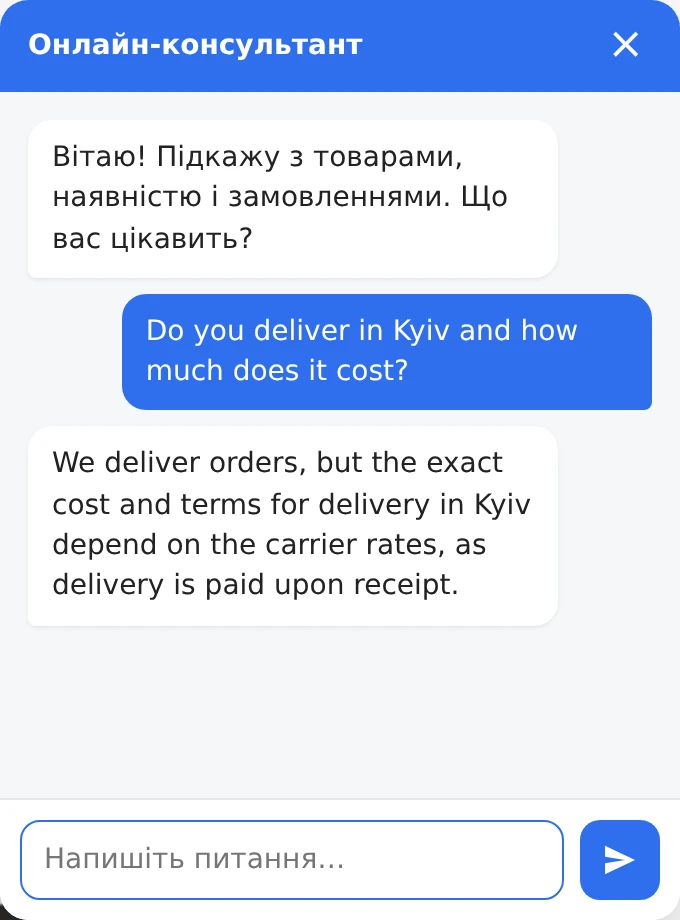
Conversation history and the customer id live on the server only; the browser sends nothing but the question. A new tab continues the same conversation.
Where to configure it
Settings → AI chat (consultant) (/admin/ai-chat). The page opens with a
Readiness card — four checks that must all be green before the widget will
talk:
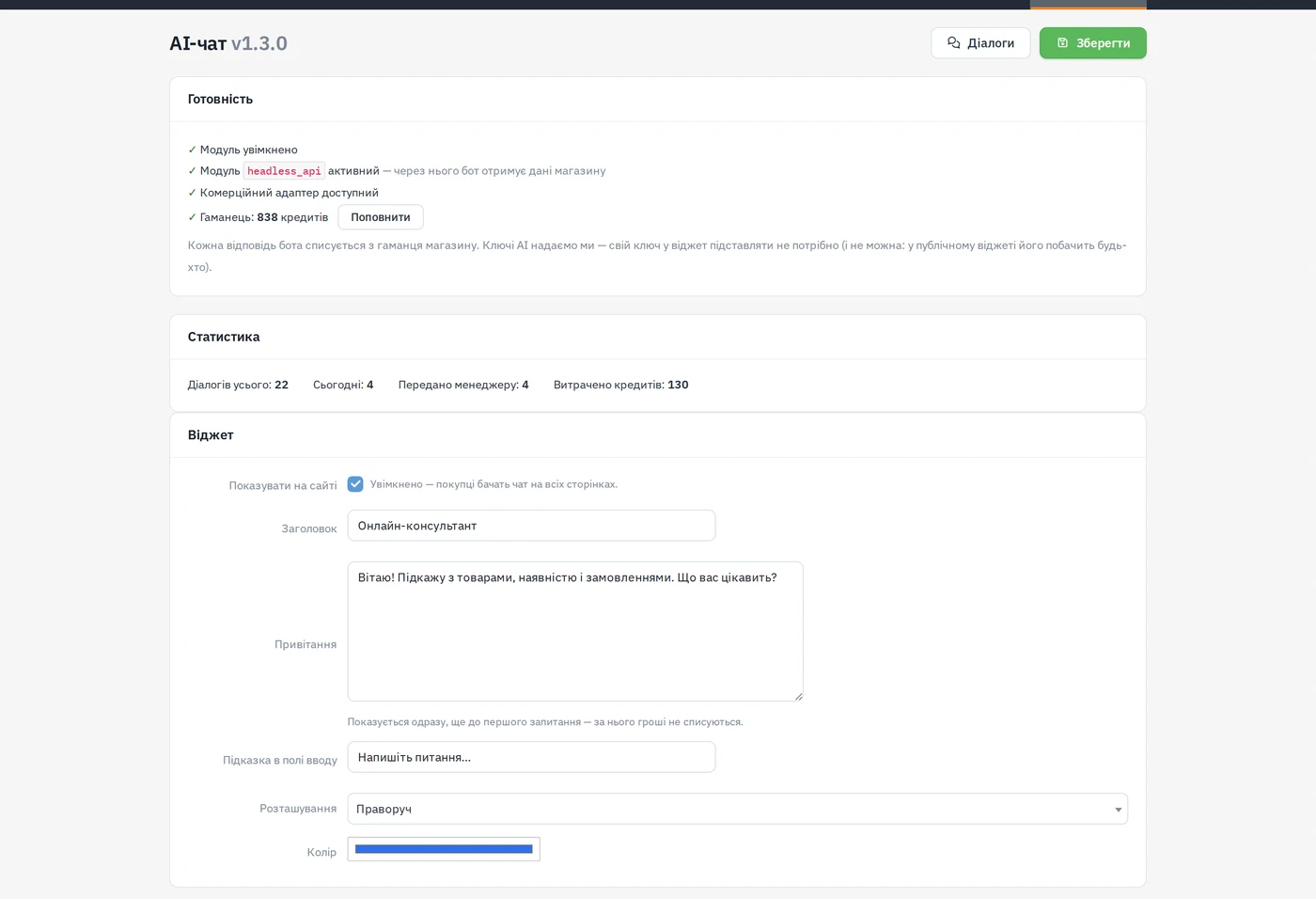
| Check | What it means |
|---|---|
| Module enabled | the ai_chat module itself is on |
headless_api active | the bot reads shop data only through this module's commerce adapter |
| Commerce adapter available | the adapter answers |
| Wallet | the shop's credit balance; Top up leads to the wallet |
Below it, the Statistics card counts dialogs (total and today), handoffs and credits spent.
Widget
| Setting | Meaning |
|---|---|
| Show on site | the master switch; off after installation, so a fresh install never spends the wallet on its own |
| Title | the header of the chat panel |
| Greeting | first message, shown before any question (free) |
| Input placeholder | hint text in the message field |
| Position | right or left corner |
| Colour | accent colour of the button and panel |
Behaviour
| Setting | Meaning |
|---|---|
| Instructions for the consultant | your own rules (working hours, wholesale only via a manager, …). They are added to the built-in rules but cannot override them: the bot never invents prices, stock or delivery times — it reads them from the shop |
| What the bot can do | a checkbox per tool: product search, product card, stock by variant, category tree, delivery/payment/contacts, site-page search, order status, waybill tracking, the logged-in customer's orders, the in-chat order form, handoff to a manager. An unticked tool does not exist for the bot. Everything except the order form and the handoff is read-only |
| Hand over to a manager | create a thread in the dialogs and a CRM task when the shopper asks for a person |
| Order right in the chat | show the name + phone form for the chosen product |
| Unavailability message | what the shopper sees when credits are gone or the gateway is down |
Limits
| Setting | Default | Meaning |
|---|---|---|
| Dialog memory | 12 | previous turns kept in context; more is smarter and more expensive, because the history is sent every time |
| Steps per answer | 6 | how many times the bot may query shop data for one answer — a ceiling against a looping search quietly burning credits |
| Messages per session per hour | 40 | protection of the wallet against automated spam |
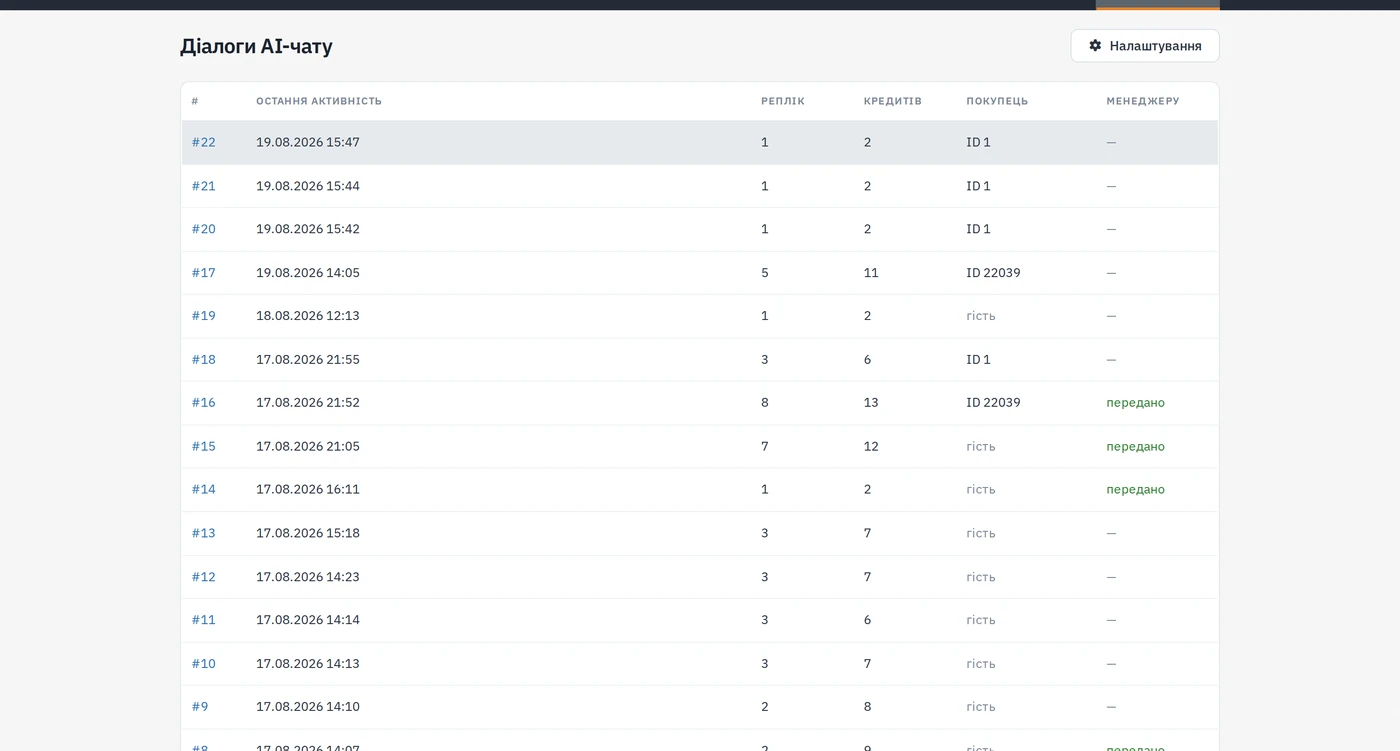
The Dialogs button (/admin/ai-chat/dialogs) lists every conversation with
its last activity, number of turns, credits spent, customer (id or guest) and
whether it was handed to a manager; a row opens the transcript.
Handoff to a manager, both directions
- The shopper asks for a person (or the bot decides it cannot help, or the
shopper asks the bot to place an order for them). With Hand over to a
manager on, the module opens a thread in Messenger (dialogs)
(
/admin/messenger) tagged Site chat, with the transcript, and creates a CRM task. - From that moment the shopper's messages go straight to the thread and do not call the AI model — so they cost no credits. The thread shows an unread counter.
- A manager opens the thread and types a reply. Nothing is "sent" anywhere: the reply is stored, and the widget picks it up itself every few seconds while the panel is open. The shopper sees it as coming from "Manager" — the operator's login name is never shown.
- The shopper can return to the bot at any time with the "back to the bot" link in the panel header.
A handoff produces an unread thread in Messenger and a CRM task — no e-mail, SMS or Telegram alert to the manager. Someone has to be watching the dialogs.
What it needs
- Four packages, not one: the
ai_chatmodule,headless_api(the adapter the bot reads through),messenger(manager replies) andai_content(the AI gateway). A missing one means a silent widget or an error instead of an answer. All are installed from the module store;ai_chatis a paid, licensed package. - Credits in the shop's wallet (Settings → Wallet). Every bot answer is charged to the wallet through the artexgroup.org AI gateway. You do not enter your own AI key anywhere — a key in a public widget would be visible to anyone. Current prices are shown in the store and the wallet, not here.
The list under "What the bot can do" is the complete list of what the module may do to the shop. It reads through the commerce adapter only; the in-chat order form is the single action that writes — and it writes a normal order, visible in the orders list like any other.
Shopper data and the AI consultant
The consultant answers with a language model, and the model is not in the shop. Below is exactly what leaves the shop, who stores it and for how long. This section is written to be quotable in the site's privacy policy as it stands.
What goes to the model
- The text of the shopper's chat messages and the consultant's answers.
- The shop name, the reply language, the address of the page the message was sent from, and the names of products the shopper has just been viewing in this visit.
- The results of queries against the shop's own data: products, prices, stock, variants, categories, delivery and payment terms, information-page text.
- The order number and phone — when the shopper typed them while asking about an order's status. Without both, the shop may not show the order at all.
- Name, phone, e-mail — when the shopper gave them in the conversation while asking for a manager.
- For a shopper who is signed in and asks about their own orders: the contents, status and total of those orders, plus the delivery address and comment stored on them.
What does NOT go to the model
- Whatever the shopper types into the in-chat order form: name, phone, address, comment, quantity. The form goes straight to the shop; the conversation gets only the line "Order No. N accepted".
- The "deliver to the same place as last time" hint: it is built on the shop's own server and shown only to the shopper's browser.
- Passwords, payment data, cookies, IP address.
Voice messages
When the shop enables the microphone, the recording goes to the AI gateway and from there to a speech-recognition service, and comes back as text in the input field so the shopper can check and fix it before sending. The gateway deletes the temporary recording file immediately after recognition and stores neither the audio nor its text.
What the shop stores
In its own database: the conversation itself (the shopper's messages and the
consultant's answers), the random session key from the cookie, the customer id
if the shopper is signed in, the locale, and the address of the page the
conversation started on. By default, with no time limit. The "Keep
conversations, days" setting turns on automatic clean-up: conversations
nobody has touched for longer than that are removed nightly by the scheduler
task ai-chat:prune. The value 0 means "delete nothing" — and that is what an
upgrade leaves in place, so updating the module never takes away what the shop
has already collected.
What the AI gateway (artexgroup.org) stores
A technical journal only: the shop's domain, the model name, token counters, credits charged, the reason the answer ended, the list of tools called, and a pseudonymous conversation identifier (a one-way hash). The conversation text is not in that journal — neither the shopper's message nor the answer. The gateway stores the conversation nowhere else.
What the model provider stores
Two models answer the shop: Qwen (Alibaba Cloud Model Studio, international region, Singapore) as the primary and Google Gemini as the fallback.
A spoken question is transcribed by a separate model, and it is not the model
that answers in the chat. The primary speech recogniser is Google Gemini
(gemini-asr); the fallback is OpenAI Whisper (whisper-1) — if the
primary does not answer, the gateway tries the fallback, so a recording can
travel there too. The order is set on the gateway (asr_model /
asr_model_fallback); it is not a setting in the module.
| Provider | Trains on API data | Retention | Zero retention |
|---|---|---|---|
| Google (Gemini API, paid tier) — fallback chat model and primary speech recogniser | no — the terms exclude it explicitly | "a limited period of time", solely to detect policy violations; the terms name no number of days | no separate mode described in the terms |
| OpenAI (Whisper) — fallback speech recogniser | no by default | up to 30 days of abuse-monitoring logs; the transcription endpoints store no abuse logs | Zero Data Retention is available for those endpoints by arrangement with OpenAI |
| Alibaba Cloud Model Studio (Qwen) | not confirmed | not confirmed | not confirmed |
Sources, checked 23 August 2026: Gemini API terms, OpenAI API data controls. No official Alibaba Cloud Model Studio terms could be located — hence "not confirmed" in the table rather than a guess. The Gemini API terms describe no separate regime for speech recognition — the same API terms cover it, so voice falls under the same row of the table.
Zero-retention mode is not enabled on the gateway for any provider. It is an arrangement with the provider, not a toggle in the module's settings.
How a shopper deletes their conversation
The "Start over" button in the chat panel opens a new conversation but does not delete the previous one — that one stays in the shop, because it is what a manager reads when the shopper asks for a human. To have the conversation itself deleted, the shopper contacts the shop and the owner removes it from their database. The shopper can also mail themselves a copy of the conversation from the chat panel, if the shop left that item enabled.
Where to address questions
- About the data in a particular conversation — to the shop, using the contacts on its contacts page: the conversation lives in the shop's database and the shop's owner deletes it.
- About the AI gateway itself — to artexgroup.org, using the contacts on its support page.