GA4 e-commerce events
ECMS9 sends the Google Analytics 4 e-commerce events from the core. You enter a Measurement ID once; the shop then loads the Google tag and reports product views, cart changes, checkout steps and purchases on every storefront theme — no theme edits, no extra module, no tag-manager setup required.
Where to enter the Measurement ID
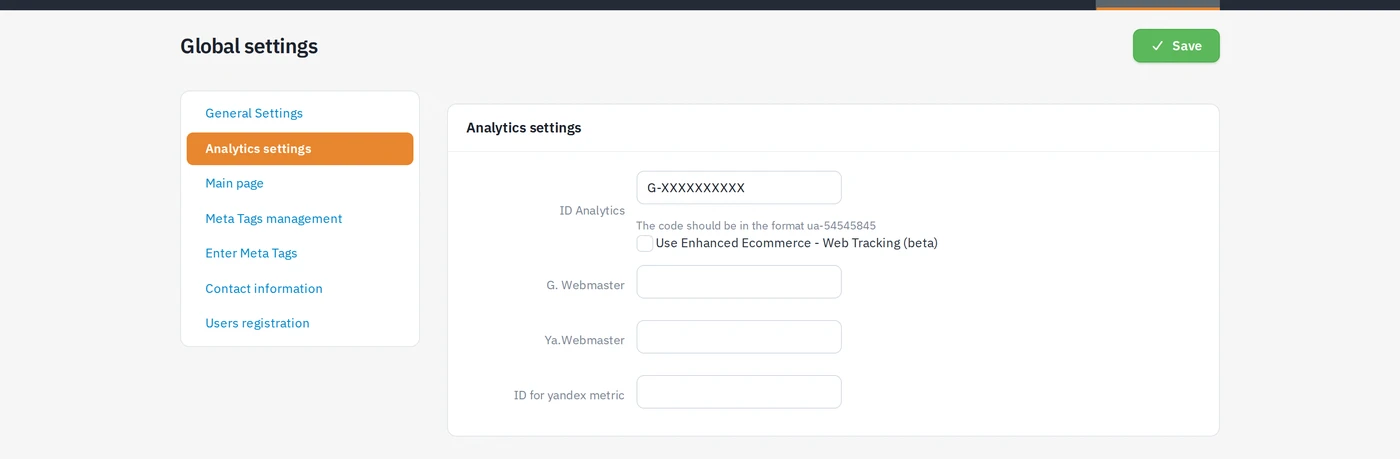
Settings → Global settings → Analytics settings, field "ID Google
Analytics". Paste the GA4 Measurement ID in the form G-XXXXXXXXXX (found in
GA4 under Admin → Data streams → your web stream).
- Only a valid
G-…id is accepted; an old Universal AnalyticsUA-…code is ignored, and so is an empty field — with no id there is no tag and no events at all. - The "Use Enhanced Ecommerce" checkbox next to it is a leftover from Universal Analytics and has no effect on GA4 events.
- If your theme already carries a Google tag or a GTM container (the page
already loads
googletagmanager.com), ECMS9 does not insert a second loader, so nothing is counted twice — the events simply flow into the tag that is already there.
Which events fire where
| Event | Page / action | Parameters |
|---|---|---|
view_item_list | category page | item_list_id, item_list_name, items (with index) |
view_item | product card | currency, value, items (first variant price) |
add_to_cart | adding a product to the cart (button or link) | items (item_id, quantity) |
remove_from_cart | removing from the cart | items |
search | submitting the site search form | search_term |
view_cart, begin_checkout | opening the cart / checkout page | currency, value, items |
add_shipping_info | choosing a delivery method | cart + shipping_tier |
add_payment_info | choosing a payment method | cart + payment_type |
purchase | the "thank you" page, first render only | transaction_id, currency, value, shipping, items, shipping_tier, payment_type |
Notes on the details that owners usually ask about:
- Currency is reported as
UAH. shipping_tieris the visible name of the chosen delivery method as the shopper sees it. For Nova Poshta the chosen service is appended, so you can tell counter, parcel locker and courier apart — e.g.Нова Пошта — Курʼєром.payment_typeis the visible name of the payment method. Both are sent again onpurchase, so revenue can be compared by carrier and by the way people paid (onpurchasethe tier is the method name only, without the Nova Poshta service).- A change of mind is reported: picking another delivery or payment method fires the event again with the new name; picking the same one twice does not.
purchaseis sent exactly once — on the first render of the confirmation page right after the order is placed. Refreshing or reopening that page later never re-sends it, so transactions are not double-counted.
Theme-independent by design
The Google tag loader is injected into <head> and the events into one script
before </body> by the core rendering pipeline, so every theme — stock or
custom — gets them, and they keep working after core updates. The listener
that reports cart changes and checkout choices watches the standard cart
endpoints and the standard deliveryMethodId / paymentMethodId fields of
the checkout form.
If a theme renders delivery or payment options with unusual mark-up, a
data-ga-label="…" attribute on the radio/select overrides the text taken
from the label, so the name in GA4 is exactly what you want.
How to verify it yourself
- Open the storefront in a browser with the Measurement ID saved, open the
developer console and type
dataLayer. You should see theconfigcall with yourG-…id followed by the events for the page —view_itemon a product card,view_item_liston a category. - Add a product to the cart, open the cart, pick delivery and payment —
add_to_cart,begin_checkout,add_shipping_info(withshipping_tier) andadd_payment_info(withpayment_type) appear indataLayeras you go. - Place a test order: the confirmation page pushes
purchasewith the order number astransaction_id. Readwindow.dataLayerrather than hookinggtag— the loader redefinesgtagand would hide a hook. - In GA4, Admin → DebugView shows the same events live when the browser
has the Google Analytics Debugger extension enabled (or the page is loaded
with
?debug_mode=1); the standard reports catch up within a day or two.
Check, in this order: the id is saved and starts with G-; the page is not
served from a cache made before you saved it (clear the site cache); an ad
blocker is not blocking googletagmanager.com in your browser.