Discounts with combined conditions
The Discounts module (Modules → Discounts) supports percent and fixed discounts with flexible targeting: category plus brand, user plus product — any logical combination.
Creating a discount
- Discount details — name, optional code, usage limit.
- Method of calculation — percent or a fixed amount.
- Discount type:
- Gift certificate — a code with a balance;
- Cumulative discount — grows with the customer's total purchases;
- Conditions (combined) — the flexible type described below.
- Allowed time — validity period or a constant discount.
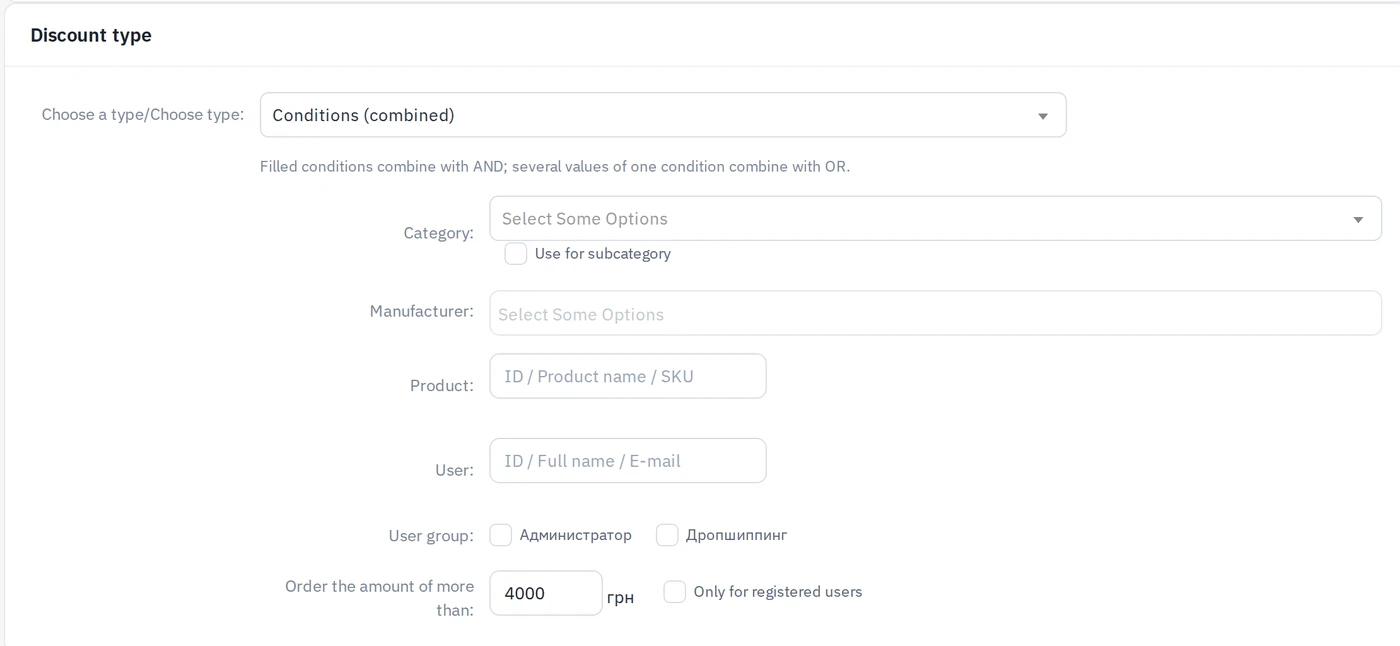
How combined conditions work
Pick any of: category (optionally with subcategories), brands (several), products (search by ID / name / SKU), users (search by ID / name / e-mail), user groups, minimum order amount, registered customers only.
The rules combine like this:
- different conditions join with AND — "category Cigarettes AND brand Marlboro" applies only when both match;
- several values of one condition join with OR — two brands selected means "either of them".
Examples:
| Goal | Conditions |
|---|---|
| −10% on a category for a loyal customer | category + user |
| −5% on two brands for orders over 1000 | brand ×2 + min order |
| Fixed −50 on a product for registered users | product + "registered only" |
Which discount applies
For every order line the system picks the single biggest matching discount — product-side discounts do not stack with each other. Then the product-side result competes with the customer's cumulative discount — again the bigger one wins. A gift certificate applies on top. A fixed discount never exceeds the line total.