Admin profiler (debug toolbar)
ECMS9 ships the standard CodeIgniter 4 debug toolbar — SQL queries with timings, timers, memory, loaded views, matched route, fired events — but it is wired so that only an Administrator who explicitly armed it sees it, on a production site, in their own browser, for 30 minutes. Nobody else gets a single byte of debug output.
Turning it on and off
| Action | URL |
|---|---|
| Enable for this browser (30 min) | /admin/profiler/enable |
| Disable | /admin/profiler/disable |
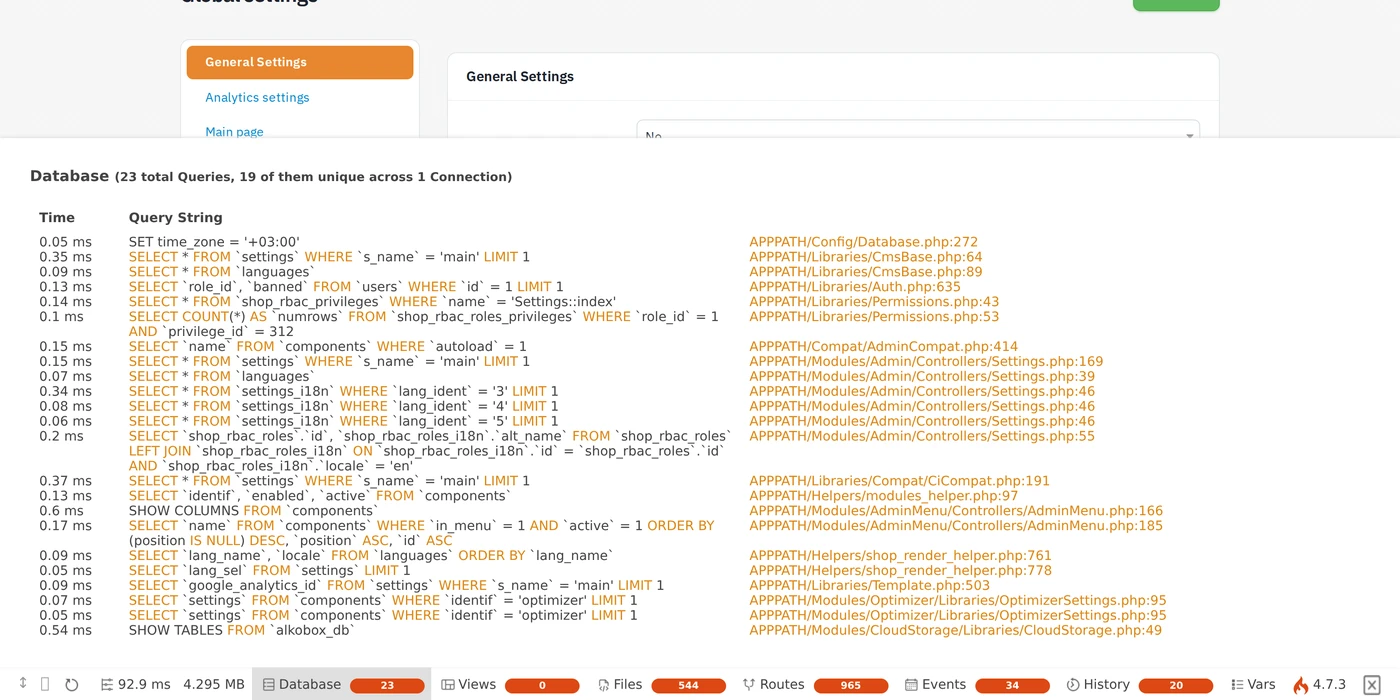
Both are plain GET routes of the Admin module (Profiler::enable /
Profiler::disable). They are not listed in shop_rbac_privileges, so per the
admin filter's fallback they are Administrator-only. After the call you are
redirected back to the page you came from (only same-host referers are
honoured; otherwise to /admin).
When the 30 minutes lapse the toolbar disappears by itself — open
/admin/profiler/enable again. If encryption.key is missing in .env, enable
fails with an error flash: the cookie cannot be signed.
Once armed, the toolbar is rendered on both the admin panel and the storefront, as long as the session is an admin session. That makes it the tool of choice for "why is this category page slow" investigations on a live site.
How the gate works
Two independent gates must both be open:
- Boot gate (
app/Config/Boot/production.php). In productionCI_DEBUGisfalse, so nothing is collected and detailed error pages are never shown./admin/profiler/enablesets a cookiecms9_profilerwith the value<expiry>:<hmac>wherehmac = hash_hmac('sha256', 'profiler:<expiry>', key)andkeyis the rawencryption.keystring from.env. On every request the boot file checks the cookie — well-formed, unexpired, signature valid viahash_equals— and only then definesCI_DEBUG = true. A forged or expired cookie leaves the site in plain production mode. - Render gate (
App\Filters\AdminDebugToolbar, registered as thetoolbarfilter alias inapp/Config/Filters.php). It extends the stockDebugToolbarfilter and injects the toolbar HTML only whenservice('auth')->isLoggedIn() && isAdmin(). This also covers development stands whereCI_DEBUGis globally on: a guest still sees nothing.
The render gate additionally sends X-LiteSpeed-Cache-Control: no-cache so a
toolbar can never be baked into a publicly served cache copy.
Query collection is the usual CI_DEBUG block in app/Config/Events.php
(DBQuery listener + toolbar()->respond()); collectors are configured in
app/Config/Toolbar.php (Timers, Database, Logs, Views, Files, Routes, Events;
maxQueries = 1000, maxHistory = 20).
The controller sets the cookie with PHP's setcookie() rather than the CI4
CookieStore — a redirect() response drops CookieStore cookies, so the
flag would never reach the browser. Keep that in mind if you touch this code.
Known pitfalls on proxied sites
- Cloudflare Rocket Loader rewrites the
typeof every<script>, which silently kills the toolbar loader.AdminDebugToolbar::after()addsdata-cfasync="false"to thedebugbar_loaderscript tag for that reason. - LiteSpeed page cache serving the guest copy to an admin: the storefront
page comes from cache, PHP never runs and there is no toolbar. The fix used
on such hosts is an
.htaccessrule that gives requests carrying thecms9_profilercookie a separate cache key (RewriteCond %{HTTP_COOKIE} cms9_profiler→RewriteRule .* - [E=cache-vary:cms9_profiler]).
Security notes for module developers
- Never rely on
CI_DEBUGbeingfalseto hide something: with the cookie it istruefor one admin's requests. Treat it as a per-request flag. - Do not log secrets through
log_message()atinfo/debuglevel — the Logs collector shows them in the toolbar to whoever armed it. - The toolbar payload for a heavy page can be close to a megabyte; this is expected and only affects the admin's own browser.